8.1 |
Licensing Fundamentals |
Licensing system statuses |
| HiPath 3000/5000 V9 supports two licensing system statuses, exception status and licensed status: |
| 1. | Exception status: Exception status is when: |
| • | a system has not (yet) been licensed after an initial system boot. The features HG 1500, S2M, BS4 and ComScendo Security each have two default licenses. |
| • | the grace period licenses or the regular licenses have expired. The system returns to exception status. |
| 2. | Licensed status: The following statuses occur in sequence in licensed status: |
| a) | The system is running on grace period licenses. Grace period licenses are automatically generated when the Manager E licensing mask opens so that licensing can be performed for the entire system, see Section 8.2.2 "Grace Period". |
| b) | The system operates with regular licenses. The system does not use the grace period licenses in this status, only the licenses that were downloaded via Manager E. |
| This guarantees that an emergency call can be made in every system status. |
Licensing procedure |
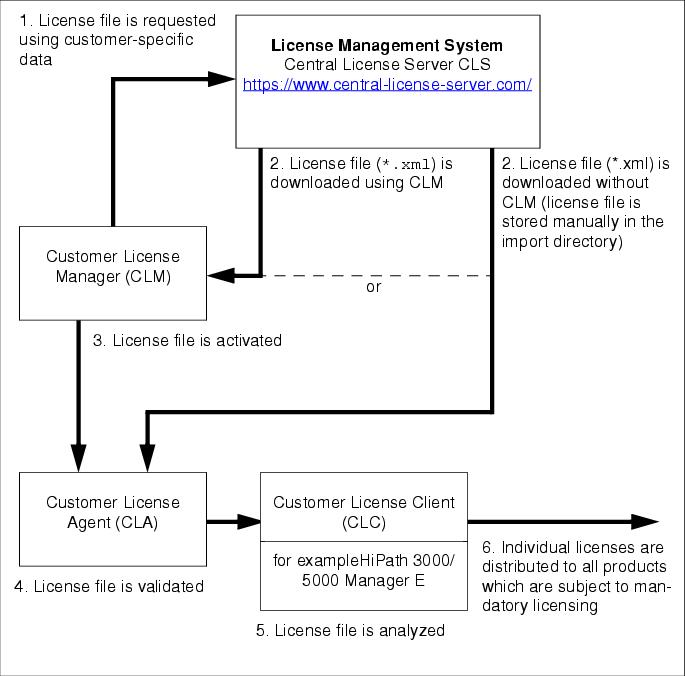
| Version 5.0 and later of HiPath 3000/5000 uses a new, centralized licensing procedure: HiPath License Management. The procedure is used in all HiPath products, for example communication systems, workpoint clients, and applications. |
| To license a product you must first establish a connection with the Central License Server (CLS) via the Customer License Manager (CLM). The customer-specific data entered is used to uniquely identify the product configuration for which the relevant license file is to be supplied in encrypted format. The license file contains the licenses for all products which are subject to mandatory licensing. |
| The CLM is responsible for activating the license file and allocating it to the Customer License Agent (CLA). This is where the license data is validated. Distribution of the licenses to the individual products using HiPath 3000/5000 Manager E can then begin. |
| HiPath 3000/5000 V9, Service Documentation, Issue 10 | up  |
|
 |
||
| Disclaimer & Copyright | ID: P31003H3590S100017620 | 2014-02-27 |