13.6.9 |
Virtual Private Network (VPN) |
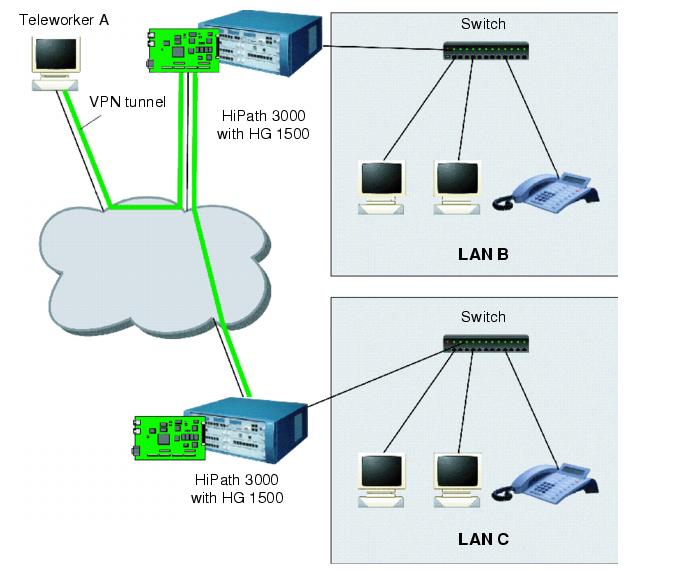
| Virtual Private Networks (VPN) connect individual computers and local networks via the Internet to form a closed virtual network. Communication in a VPN is tunneled through the Internet (encapsulated) and is protected from tapping and access by third parties such as Internet users and providers that are not a part of the VPN. A VPN enables an intranet to be extended beyond the LAN, for example to home workstations or branch offices, without requiring a dedicated line. |
|
|
| Figure 13-4 | VPN - Sample Configuration
|
| A VPN provides the following key functions: |
| • | The tunnel endpoints (gateway or teleworker PC) are reliably identified. |
| • | Exchanged data is protected from tapping during transmission. |
| • | Exchanged data is protected from being modified during transmission. |
| A VPN therefore guarantees that data actually comes from where it appears to have come from. that they are transferred from there unaltered; and that they are not made known to a third party on the way. |
| The HG 1500 provides this function based on IPsec - a secure implementation of the IP protocol on level 3. This ensures that the VPN is transparent to applications as well as hardware. |
| The safety functions of VPN are available for the connection of LANs. In this case, they are completely transparent to the computers participating in the LANs. They can also be used for connecting individual computers (teleworkers). In this case, the VPN client software installed on the teleworker PC must be compatible with the VPN functions of HG 1500. |
| A VPN (Virtual Private Network) is a network where communication is protected as far as humanly possible against tapping, clandestine modification and the misrepresentation of fake tunnel endpoints. |
| The required protocols are available in the HG 1500. Before a VPN can be created, however, the gateway itself, and especially its administration, must be made secure against attacks. |
13.6.9.1 |
Secure Mode |
| Unless special measures are taken, HG 1500 operates in non-secure mode. This means, among other things, that administration access is not encrypted during transmission over the network. |
| The gateway recognizes the following security modes: |
| • | Factory mode: has no configuration data. |
| • | Insecure mode: gateway is configured, SSL and VPN are disabled. Insecure data transmission is possible. |
| • | Activation of SSL: intermediate status between introduction of secure mode and configuration of SSL. Access is only possible via CLI at the V.24 interface; no data transmission is allowed. |
| • | Secure administration: SSL is enabled. Access via CLI at the V.24 interface and WBM (via HTTPS) are possible. User data is transferred in insecure mode, and configuration data and software images are transferred in secure mode. |
| • | Secure mode: SSL and VPN are active and configured. Access via CLI at the V.24 interface and WBM (via HTTPS) are possible. Secure and insecure data transmission are possible according to the security policy configured. |
| Since a gateway in insecure mode would represent a weak point in the VPN, it must be placed in secure mode before the VPN can be configured. This requires a certain degree of effort to prevent any hackers from getting into the system during this phase of the process and undermining the subsequent steps taken. |
| The following steps must be taken for the gateway to be in secure mode: |
| 1. | Connect a terminal (or a PC with a terminal emulation program) to the V.24 interface of the gateway. |
| 2. | Restart the gateway with the CLI command reset secure. When this is done, all user settings are lost and all user data transmissions are interrupted until the gateway is reconfigured. |
| At this point, the gateway is in "activation of SSL" mode. In this mode it can only be configured using CLI at the V.24 interface - WBM, Telnet, HiPath 3000 Manager E and SNMP are disabled. |
| 3. | The gateway must be set up for SSL mode. First, the CLI command create SSL certificate must be used to generate a server certificate with which the gateway can identify itself to SSL clients. After that, SSL can be activated with the enable ssl command. |
| At this point, the gateway is in "secure administration" mode and can only be configured using CLI at the V.24 interface or WBM via HTTPS - Telnet, HiPath 3000 Manager E and SNMP are disabled. |
| 4. | Start the browser for access to WBM and enter the gateway address with the protocol "https://" (you can enter the port number "443" after the gateway address). The browser displays the previously configured server certificate which must be manually checked and approved. It can now also be installed in the browser to avoid future requests for it. |
| Use WBM to set up the VPN as described in the following section. |
13.6.9.2 |
Security Policy |
| The security policy determines the procedure for IP packets. The following actions are possible: |
| • | rejecting |
| • | forwarding (normal routing without VPN functionality) |
| • | tunneling (forwarding over the VPN) |
| The handling of IP packets can be specified in the HG 1500 according to IP address, port number and protocol (TCP or UDP). For tunneled packets, you must determine: |
| • | which algorithms for encryption and authentication are permissible on the connection, |
| • | the period of validity for the security association. |
13.6.9.3 |
Security Associations |
| A Security Association (SA) combines an encryption algorithm and its parameters with a session key and the key's period of validity This ensures the security of a VPN connection session. |
| VPN connections with the HG 1500 always require three SAs: one for initial mutual verification of identity and exchange of keys, and one for each direction of the connection once it is set up. The SAs are negotiated using the IKE (Internet Key Exchange) in accordance with RFC2409. The required keys are exchanged with the Diffie-Hellman algorithm using Oakley Group 2 or 5. Hash procedures available are SHA-1 and MD5. |
|
| Both the main mode and the aggressive mode are supported for negotiating the IKE security association. HG 1500 uses main mode if the peer also offers main mode. Teleworkers who use pre-shared keys must configure aggressive mode. |
| The period of validity for negotiated security associations can be limited by time or transmitted data volumes. |
13.6.9.4 |
Tunnel |
| HG 1500 V3.0 supports up to 256 tunnels per board. |
| A tunnel is a secure VPN connection to another VPN gateway or a VPN client. The HG 1500 establishes tunnels on level 3 based on IPsec. |
Tunnel Configuration |
| For a tunnel to be set up, each terminal must be authenticated by the device at the other side. Otherwise an LDAP server is used. The HG 1500 supports procedures that use public keys as well as procedures based on shared secrets - similar to passwords. |
| For authentication using public keys, the HG 1500 can have CA (Certificate Authority) authentication certificates assigned to it manually. However, it can also obtain CRLs (Certificate Revocation Lists) automatically from an LDAP server. |
| For the authentication of VPN stations, the HG 1500 supports certificates according to X.509. HG 1500 supports DSA and RSA as Public-Key algorithms. |
HG 1500 as Certification Authority CA |
| As long as no other CA is available, the HG 1500 can, to a certain degree, act as a CA. It can generate pairs of public and private keys, issue and sign relevant certificates, and save keys and their corresponding certificates to files. |
| There is, however, no option to automatically transfer such certificates to clients; every such transfer must be manually performed - with disks, for example. |
| Any subsequent certificate management, such as monitoring the period of validity or allocating certificates to client data, must also be done manually. |
| The HG 1500 can create CRLs (Certificate Revocation Lists) of certificates that are considered insecure and therefore are declared invalid before the end of the normal period of validity. These lists must be distributed manually. |
| HG 1500 can work with certificates from external CAs. However, they can also issue certificates which can be used by other tunnel endpoints to authenticate themselves in a VPN. This function is called "Lightweight CA" and requires a separate license. |
13.6.9.5 |
Data Security |
| The HG 1500 supports ESP to protect utility data during transmission over the VPN. |
| DES, Triple DES (3DES) and AES are available as encryption algorithms. |
| HMAC-SHA1 and HMAC-MD5 are supported as MAC algorithms (MAC - Message Authentication Code). |
| The HG 1500 supports X.509 certificates as well as DSA and RSA, two public key algorithms, and pre-shared keys for authenticating VPN subscribers. |
| HiPath 3000/5000 V9, Service Documentation, Issue 10 | up  |
|
 |
||
| Disclaimer & Copyright | ID: P31003H3590S100017620 | 2014-02-27 |
