13.6.8 |
Internet Gateway |
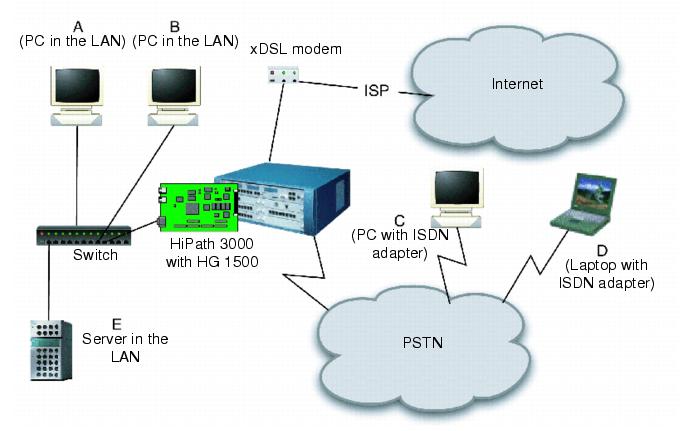
| The HG 1500 can function in a variety of ways as an Internet gateway for clients in the LAN or for dialed-up devices. |
| |
| The second Ethernet interface enables connection of an xDSL modem which the HG 1500 addresses via PPPoE. Any client connected to the HG 1500 over IP can use an Internet connection via this modem. Multiple clients can utilize the Internet connection simultaneously thanks to NAT support (see Section 13.6.8.2 "Network Address Translation (NAT)"). |
| Clients that are connected to the HG 1500 via a PSTN dial-in connection (RAS functionality) can also utilize the Internet connection. If appropriately configured, these users can also access servers in the LAN. |
| |
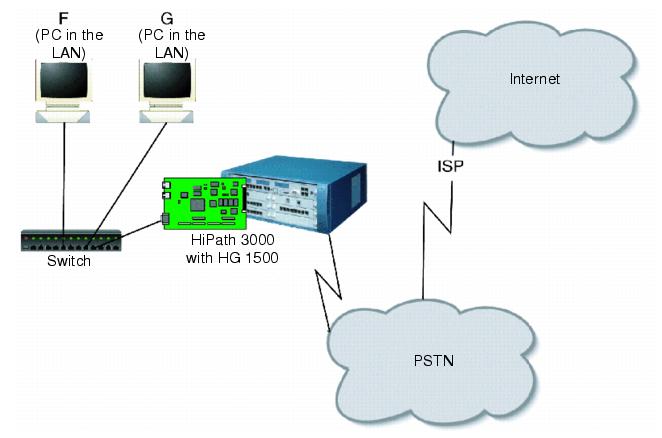
| The HG 1500 can also set up a PPP connection to an ISP via one or more B channels. This connection, too, can be used simultaneously by multiple clients in the IP network. |
13.6.8.1 |
PPP, PPPoE and PPTP |
| The HG 1500 supports PPP (Point-to-Point Protocol) for both incoming and outgoing SCN connections. PPPoE (PPP over Ethernet) and PPTP (Point-to-Point Tunneling Protocol) are supported for devices on the second LAN interface (typically an xDSL modem). |
| Connections from the LAN to the SCN are set up on the basis of the IP address addressed by the LAN. The IP address is converted to a station number (this requires appropriate configuration of the routing and dial tables). A prerequisite is that the remote station has a static IP address. |
| After the connection has been set up, the HG 1500 can accept a dynamic IP address. Packets for terminals in a local IP network are converted with NAT (see Section 13.6.8.2 "Network Address Translation (NAT)"). |
| There are various security and authentication mechanisms for PPP connections. Further details can be found in Section 13.6.8.3 "Access Protection". |
13.6.8.2 |
Network Address Translation (NAT) |
| Network Address Translation (NAT) is the conversion of IP addresses in the LAN for the Internet. HG 1500 provides NAT for Internet connections via a second Ethernet interface as well as for PPP connections via B channels. |
| As far as the Internet is concerned, the entire LAN appears to be a single IP address and can therefore use a common dial-up connection to an ISP, for example. Additionally, direct IP attacks from the Internet on terminals in the LAN are not possible. |
| NAT can be enabled and disabled in the HG 1500. Certain services - such as VoIP or video telephony - embed subscribers' IP addresses in their data packets, however, instead of just noting them in the packet headers. They are only compatible with NAT within a VPN. |
13.6.8.3 |
Access Protection |
| A variety of security functions are available to prevent unauthorized usage: |
Checking Caller Numbers |
| Connections from the PSTN can be checked against a list of known users using the caller number. Users whose connections do not transmit a caller number (for example analog telephones) can call an MSN that is set up especially for them. |
Callback |
| All users can be configured so that they can be called back. Thus, PPP connections are only possible from a predefined connection. |
User Account and Password |
| After setting up a connection, the user account and password can be checked using PAP (Password Authentication Protocol), CHAP (Challenge Handshake Authentication Protocol) or MSCHAP (Microsoft Challenge Handshake Authentication Protocol. |
| HG 1500 also supports these protocols as a client when dialing in to a RAS server (for example with an ISP). |
IP Address Filter for Communication with the LAN |
| IP address filters can be defined to prevent attacks on devices in the LAN, both from insecure (external) networks and from within the LAN. When IP filtering is activated, access is only possible from address ranges that have explicit permission, and this access is only possible to specified addresses. Optionally, access can be further limited to a specific protocol port. |
MAC Address Filters for Using the Gateway from within the LAN |
| MAC address filters can limit access to the router from devices within the LAN. When MAC filtering is activated, only devices within the LAN whose IP and MAC addresses have explicit permission to do so may set up a connection via the HG 1500. (This function cannot be defined with dynamic IP address allocation in the LAN via BootP or DHCP). |
Access Protection for Administrative Access |
| General administrative access and access to accounting data can each be separately limited to specific IP addresses, regardless of any other IP filters. |
13.6.8.4 |
Multilink |
| The HG 1500 can set up static or dynamic PPP connections with a remote station via several B channels simultaneously. |
| A static multilink uses the same number of B channels for the duration of the connection. A dynamic multilink adds or removes channels depending on current channel load. These parameters can be configured. |
13.6.8.5 |
Short-hold |
| After a preconfigured time period with no data transfer over a PPP connection, the HG 1500 can clear down the connection automatically. |
13.6.8.6 |
IP Control Protocol (IPCP) |
| The HG 1500 supports the IP Control Protocol (IPCP) for dynamic handling of IP addresses during connection setup. |
13.6.8.7 |
Compression of IP Headers |
| Significant protocol overhead can develop, especially during voice data transmission where user data in a packet is typically short. To improve the situations, the HG 1500 supports the compression of IP headers according to RFC 2507 and RFC 2508. The compression is negotiated during the configuration of the connection with the receiver in accordance with RFC 1332 and RFC 2509. |
13.6.8.8 |
Data Compression |
| User data in a PPP connection can be compressed with the STAC or the MPPC algorithm. The compression for each channel is negotiated separately with the remote station. |
|
13.6.8.9 |
IP accounting |
| HG 1500 saves information about transferred data for the purposes of IP connection accounting. |
| Accounting data is saved for: |
| • | PPP connections via SCN |
| • | DSL connections |
| • | Routing via the LAN2 Ethernet interface |
| The following information is saved: |
| • | Data volume (sent and received) |
| • | IP addresses (sender and recipient) |
| • | Port number of the recipient |
| • | TCP or UDP protocol ID |
| • | Time (start of transfer and last activity) |
| • | For PPP connections: Address and station number of PPP peer |
Reading the Accounting Data |
| The Accounting Server (ACC) saves the data in the gateway. This data can be read out by the IP Accounting Client - an application on a PC - by means of a TCP connection, and then processed - for billing, for example. The IP accounting client is a supplementary product; instructions for its use are described in the accompanying documentation. |
| The IP Accounting Client must be connected to the gateway via a permanent IP connection. |
| To ensure data protection, a user name and password must be entered before the read-out. It addition, it is also possible to specify that reading is only possible from certain IP addresses. |
| IP Accounting must be activated and the connection parameters set for the IP Accounting Client before it can be used. Both configurations are described in the HG 1500 Configuration Manual. |
| HiPath 3000/5000 V9, Service Documentation, Issue 10 | up  |
|
 |
||
| Disclaimer & Copyright | ID: P31003H3590S100017620 | 2014-02-27 |