|
|
|

|
3.3.35 |
TMANI, TMANI-IM, TMANI-BRA [TMANI8] |
|
Occupation variants of TMANI8 |
| The TMANI8 for HiPath 3800 can be occupied in the following variants based on a common PCB: |
| • | TMANI (S30810-Q2327-X): Fully occupied board, i.e. with call charge filter, call detail recording and jumper for ground start/loop start configuration. |
| • | TMANI-IM (S30810-Q2327-X1): Board without call charge filter and call detail recording; only loop start, no ground start. |
| • | TMANI-BRA (S30810-Q2327-X82, for Brazil): Board without call charge filter and call detail recording; only loop start, no ground start; Special surge arrestor with varistors. |
Features |
| • | Interfaces: |
| The TMANI, TMANI-IM and TMANI-BRA boards provide 8 interfaces for the analog trunk connection (MSI: Ground Start [not with IM and BRA] or Loop Start) for HiPath 3800. The ground start function is only used in the U.S. and Canada. |
| • | The interfaces for the analog trunk connection support the CLIP feature. |
| • | Pulse dialing and multi-frequency dialing |
| • | Call detail recording with TMANI: |
| The interfaces for the analog trunk connection support call detail recording with 12 kHz and 16 kHz pulses. Call detail recording is selected automatically via the country setting of the system. Call detail recording with 50 Hz pulses is not supported. |
|
| With HiPath 3000/5000 Manager E, call detail recording can be activated and deactivated (Settings menu: Lines/networking ... -> Trunks -> (double-click) Parameters -> MSI flags -> Flags -> Charge module activated). |
| • | Silent Reversal: |
| "Silent Reversal", which is used to register the beginning and end of an outgoing call in different countries, is also supported. It can be activated with HiPath 3000/5000 Manager E (Settings menu: Lines/networking ... -> Trunks -> (double-click) Parameters -> MSI flags -> Flags -> Silent Reversal). |
| • | ÜFS direct inward dialing: |
| The Austrian direct inward dialing system ÜFS is not supported. |
Installation instructions in the U.S. and Canada: |
| According to U.S. and Canadian installation instructions, analog trunks must be connected over fuse elements in compliance with UL 497A or CSA C22.2 No. 226. |
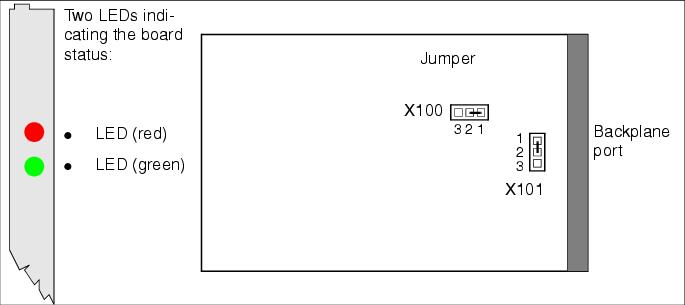
Front panel, LEDs |
| An additional shielding panel is not required on the front side of this board, because the EMC shield is already provided by the front panel. |
Jumper for setting the procedure for analog trunk interfaces |
| The procedure for the analog trunk interfaces is set via jumper X100 and X101. |
| • | Loop start setting = pins 1-2 closed (default) |
| • | Ground start setting = Pins 2 - 3 closed [not with IM and BRA] |
LED statuses and their meanings |
Cable and connector assignment |
| • | For connecting to the SIVAPAC connector on the backplane: Table 3-135 |
| • | For connecting to the connector panels using RJ45 jacks: Table 3-136 |
| • | For U.S. only: For connecting to the connector panels with CHAMP jack: Table 3-137 |
| • | For connecting to the connector panels using SIPAC 1 SU connectors: Table 3-138 |
|
|
|
|
|
|
|
|
|
|
|
|
|
|
|
|
|
|
|
|
|
|
|
|
|
|
|
|
|
|
|
|
|
|
|
|
|
|
|
|
|
|
|
|
|
|
|
|
|
|
|
|
|
|
|
|
|
|
|
|
|
|
|
|
|
|
|
|
|
|
|
|
|
|
|
|
|
|
|
|
|
|
|
|
|
|
|
|
|
|
|
|
|
|
|
|
|
|
|
|
|
|
|
|
|
|
|
|
|
|
|
|
|
|
|
|
|
|
|
|
|
|
|
|
|
|
|
|
|
|
|
|
|
|
|
|
|
|
|
|
|
|
|
|
|
|
|
|
|
|
|
|
|
|
|
|
|
|
|
|
|
|
|
|
|
|
|
|
|
|
|
|
|
|
|
|
|
|
|
|
|
|
|
|
|
|
|
|
|
|
|
|
|
|
|
|
|
|
|
|
|
|
|
|
|
|
|
|
|
|
|
|
|
|
|
|
||||||||||||||||||||||||||||||||||||||||||||||||||||||||||||||||||||||||||||||||||||||||||||||||||||||||||||||||||||||||||||||||||||||||||||||||||||||||||||||||||||||||||||||||||||||||||||||||||||||||||||||||||||||||||||
|
|
|
|
|
|
|
|
|
|
|
|
|
|
|
|
|
|
|
|
|
|
|
|
|
|
|
|
|
|
|
|
|
|
|
|
|
|
|
|
|
|
|
|
|
|
|
|
|
|
|
|
|
|
|
|
|
|
|
|
|
|
|
|
|
|
|
|
|
|
|
|
|
|
|
|
|
|
|
|
|
|
|
|
|
|
|
|
|
|
|
|
|
|
|
|
|
|
|
|
|
|
|
|
|
|
|
|
|
|
|
|
|
|
|
|
|
|
|
|
|
|
|
|
|
|
|
|
|
|
|
|
|
|
|
|
|
|
|
|
|
|
|
|
|
|
|
|
|
|
||||||||||||||||||||||||||||||||||||||||||||||||||||||||||||||||||||||||||||||||||||||||||||||||||||||||||||||||||||||||||||||||||||||||||||||||||||||||
|
|
|
|
|
|
|
|
|
|
|
|
|
|
|
|
|
|
|
|
|
|
|
|
|
|
|
|
|
|
|
|
|
|
|
|
|
|
|
|
|
|
|
|
|
|
|
|
|
|
|
|
|
|
|
|
|
|
|
|
|
|
|
|
|
|
|
|
|
|
|
|
|
|
|
|
|
|
|
|
|
|
|
|
|
|
|
|
|
|
|
|
|
|
|
|
|
|
|
|
|
|
|
|
|
|
|
|
|
|
|
|
|
|
|
|
|
|
|
|
|
|
|
|
|
|
|
|
|
|
|
|
|||||||||||||||||||||||||||||||||||||||||||||||||||||||||||||||||||||||||||||||||||||||||||||||||||||||||||||||||||||||||||||||||||||||
|
|
|
|
|
|
|
|
|
|
|
|
|
|
|
|
|
|
|
|
|
|
|
|
|
|
|
|
|
|
|
|
|
|
|
|
|
|
|
|
|
|
|
|
|
|
|
|
|
|
|
|
|
|
|
|
|
|
|
|
|
|
|
|
|
|
|
|
|
|
|
|
|
|
|
|
|
|
|
|
|
|
|
|
|
|
|
|
|
|
|
|
|
|
|
|
|
|
|
|
|
|
|
|
|
|
|
|
|
|
|
|
|
|
|
|
|
|
|
|
|
|
|
|
|
|
|
|
|
|
|
|
|
|
|
|
|
|
|
|
|
|
|
|
|
|
|
|
|
|
|
|
|
|
|
|
|
|
|
|
|
|
|
|
|
|
|
|
|
|
|
|
|
|
|
|
|
|
|
|
|
|
|
|
|
|
|
|
|
|
|
|
|
|
|
|
|
|
|
|
|
|
|
|
|
|
|
|
|
|
|
|
|
|
|
|
|
|
|
|
|
|
|
|
|
|
|
|
|
|
|
|
|
|
|
|
|
|
|
|
|
|
|
|
|
|
|
|
|
|
|
|
|
|
||||||||||||||||||||||||||||||||||||||||||||||||||||||||||||||||||||||||||||||||||||||||||||||||||||||||||||||||||||||||||||||||||||||||||||||||||||||||||||||||||||||||||||||||||||||||||||||||||||||||||||||||||||||||||||||||||||||||||||||||||||||||||||||||||
| HiPath 3000/5000 V9, Service Documentation, Issue 10 | up  |
|
|
||
| Disclaimer & Copyright | ID: P31003H3590S100017620 | 2014-02-27 |